
How We Built a Flutter App and Supercharged Its Testing with AI
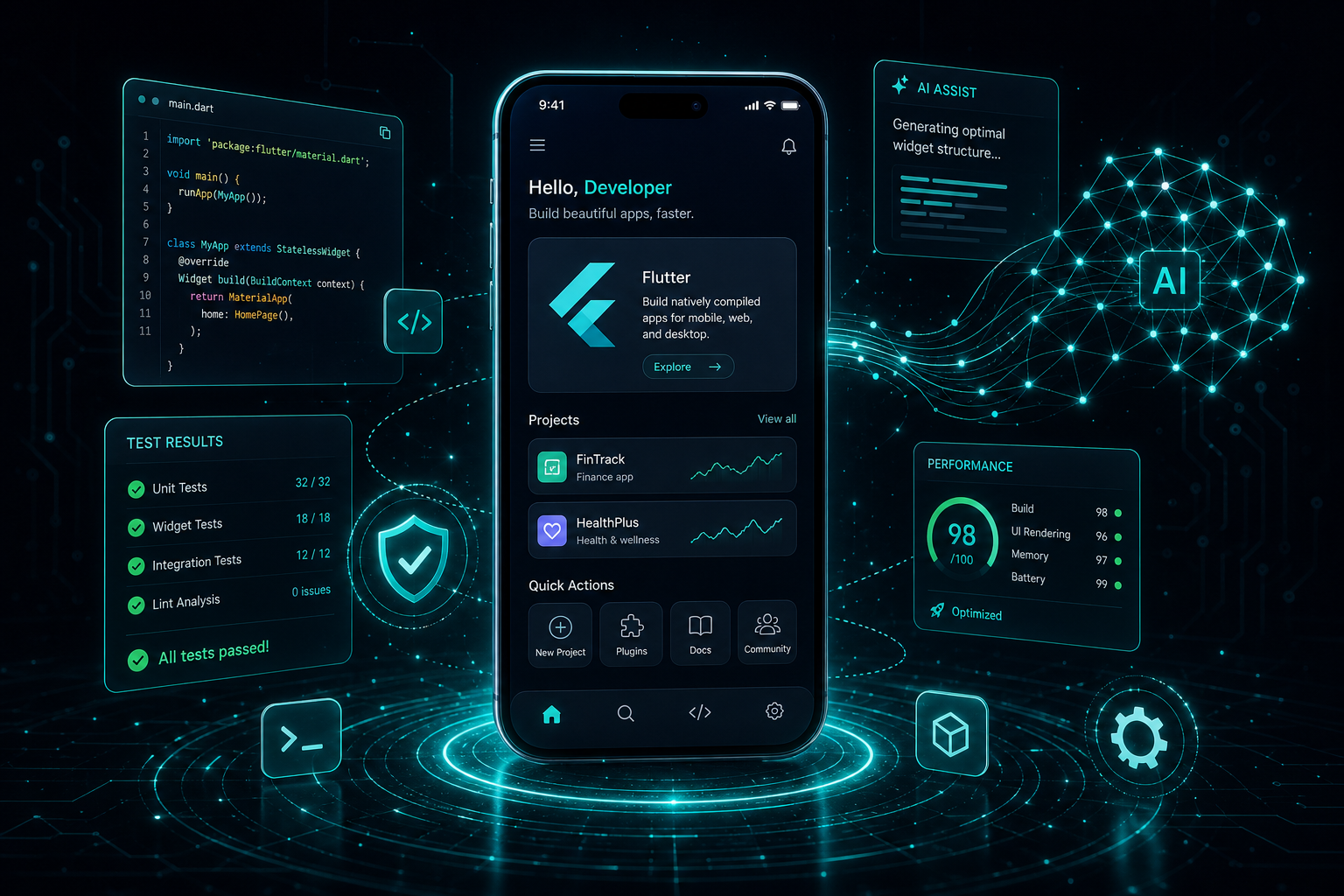
InfAI's engineering team built a cross-platform Flutter application and then used AI to transform the testing and QA process — achieving 85%+ test coverage, faster releases, and fewer production bugs.
Key Takeaways
- 1InfAI's engineering team built a cross-platform Flutter application and then used AI to overhaul the testing framework — boosting test coverage from roughly 40% to over 85% while cutting QA cycle time in half.
- 2AI-generated test cases, intelligent test prioritization, and automated test maintenance allowed our engineers to ship faster without sacrificing quality.
- 3This project exemplifies InfAI's AI-first engineering philosophy: we don't just write code, we build intelligent workflows that compound quality over time.
When our client approached us to build a cross-platform mobile application, the brief was straightforward: a performant, polished app that runs on both iOS and Android from a single codebase. We chose Flutter — Google's UI toolkit — and got to work.
The app itself was well within our wheelhouse. What made this project genuinely interesting was what came next: we used AI to fundamentally rethink how we test, maintain, and ship mobile software.
This post walks through how we built the app, why we invested in an AI-enhanced testing framework, and the measurable results it delivered. If you're an engineering leader thinking about how AI fits into your development lifecycle — beyond just code generation — this is for you.
Why Flutter Was the Right Call
We evaluated React Native, native development (Swift + Kotlin), and Flutter before recommending Flutter to the client. The decision came down to three factors:
- Single codebase with near-native performance — Flutter compiles to native ARM code, which meant we could deliver iOS and Android from one team without the typical cross-platform trade-offs.
- Widget-based architecture that maps naturally to component testing — Flutter's composable widget tree gave us a clean surface for writing isolated widget tests, which became critical when we layered AI into the testing process.
- Dart's type safety and tooling — strong typing catches entire categories of bugs at compile time, and Dart's built-in test framework gave us a solid foundation to build on.
Our team shipped the core application in 14 weeks: authentication flows, a real-time data dashboard, offline-first sync, push notifications, and a design system that matched the client's brand guidelines pixel-for-pixel.
The Testing Problem We Needed to Solve
With the app in production, we faced a reality that every mobile engineering team knows: testing was falling behind.
Our initial test suite covered the basics — happy-path unit tests for business logic, a handful of widget tests for critical UI components, and a small set of integration tests that ran on CI. Coverage hovered around 40%, and the team was spending increasing amounts of time on manual QA for each release.
The symptoms were predictable:
- Edge cases slipped through to production — null states, race conditions in the sync engine, and UI overflow on smaller devices.
- Every UI change triggered a cascade of broken test assertions that had to be fixed by hand before the pipeline would pass.
- The team couldn't confidently answer: "Which tests should we run after this PR?"
- QA cycles stretched to 3-4 days per release, creating a bottleneck that slowed everything downstream.
We didn't need more manual effort thrown at the problem. We needed a smarter system. So we did what InfAI does best: we brought AI into the engineering workflow.
AI-Generated Test Cases: Catching What Humans Miss
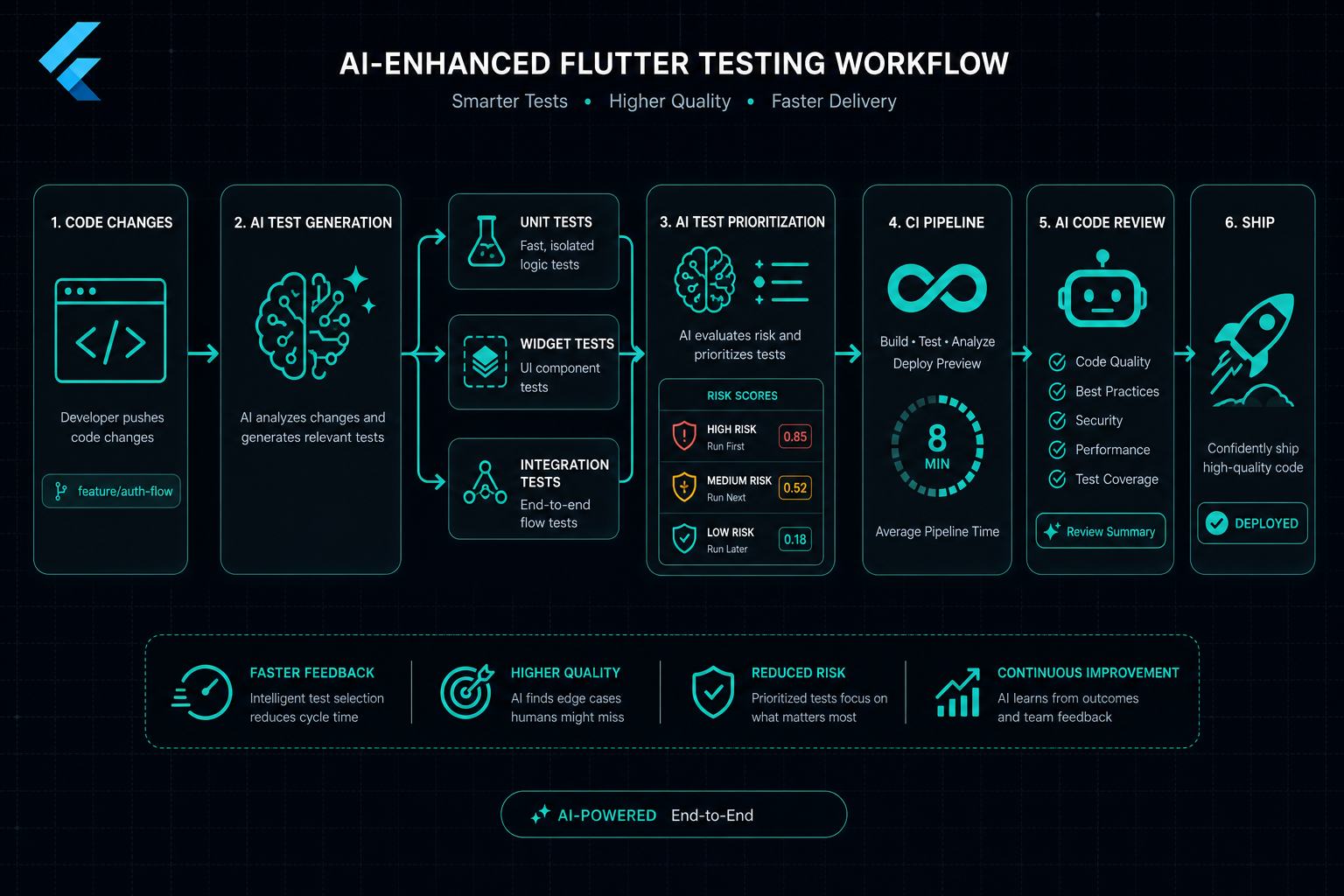
The first capability we built was AI-powered test generation. Our engineers fed the application's widget tree, state management logic, and API contracts into a custom AI pipeline that analyzed the code and generated test cases.
This wasn't about replacing human-written tests — it was about augmenting them. The AI excelled at identifying edge cases that our engineers hadn't prioritized:
- Boundary conditions in form validation — what happens when a user pastes 10,000 characters into a text field, enters Unicode in a phone number input, or submits a form while the network is transitioning from offline to online?
- State explosion in complex flows — the AI mapped every reachable state combination in the authentication flow and generated tests for states our team hadn't considered, like a token refresh occurring mid-navigation.
- Platform-specific rendering — the AI generated widget tests that asserted correct behaviour across different screen densities and text scale factors, catching overflow issues that only appeared on smaller Android devices.
Within two weeks of deploying this capability, we had generated over 400 new test cases. Our engineers reviewed each one, kept the valuable ones, and refined the AI's prompts based on what it got wrong. The feedback loop was critical — the AI improved with each cycle.
“The AI didn't replace our engineers' judgment — it expanded their reach. Humans decide what matters; AI makes sure nothing gets missed. That's the model we believe in at InfAI, and this project proved it works in practice.
AI-Powered Test Maintenance: The End of Brittle Tests
Any team that has maintained a large test suite knows the pain of brittle tests. You change a button label, tweak a layout, or rename a widget — and suddenly 30 tests fail. Not because the functionality is broken, but because the assertions were tightly coupled to implementation details.
We built an AI-powered test maintenance system that solved this. When a PR introduced UI changes, the system would:
- Detect which widgets had changed and map those changes to the affected test files.
- Analyze whether the change was cosmetic (label text, color, padding) or functional (new state, different navigation, altered data flow).
- For cosmetic changes, automatically update test assertions to match the new UI — generating a diff for the engineer to review and approve.
- For functional changes, flag the affected tests and generate suggested assertion updates with explanations of what changed and why the old assertion no longer applies.
The impact was immediate. Before this system, our engineers spent an average of 2-3 hours per sprint fixing broken tests after UI updates. After deployment, that dropped to under 20 minutes — mostly spent reviewing the AI's proposed changes.
Pro tip: When building AI-powered test maintenance, don't let the AI auto-merge its changes. Always keep a human review step. The value is in eliminating the tedious work of identifying what needs to change — not in removing human oversight of what changed.
Intelligent Test Prioritization: Running the Right Tests at the Right Time
Running the full test suite on every commit is a noble goal, but on a growing Flutter app with hundreds of tests, it's also slow. Our CI pipeline was taking 25 minutes per run, and engineers were losing momentum waiting for results.
We built an intelligent test prioritization system that uses AI to determine which tests are most relevant to a given code change. The system works in three layers:
Static dependency analysis
The AI maps the dependency graph of the codebase — which tests exercise which files, widgets, and functions. When a PR changes specific files, the system identifies every test that touches those files directly or transitively.
Historical failure correlation
The AI maintains a model trained on our CI history: which tests have failed in the past, and what kinds of code changes preceded those failures. If a PR modifies the sync engine, the system up-ranks integration tests that have historically been sensitive to sync-related changes — even if the dependency graph doesn't show a direct connection.
Risk scoring and tiered execution
Every test gets a risk score for each PR based on dependency proximity and failure history. High-risk tests run immediately; medium-risk tests run in parallel; low-risk tests are deferred to a nightly full-suite run. The result: our average CI time dropped from 25 minutes to 8 minutes per PR without sacrificing confidence.
AI-Assisted Code Review: Catching Bugs Before QA
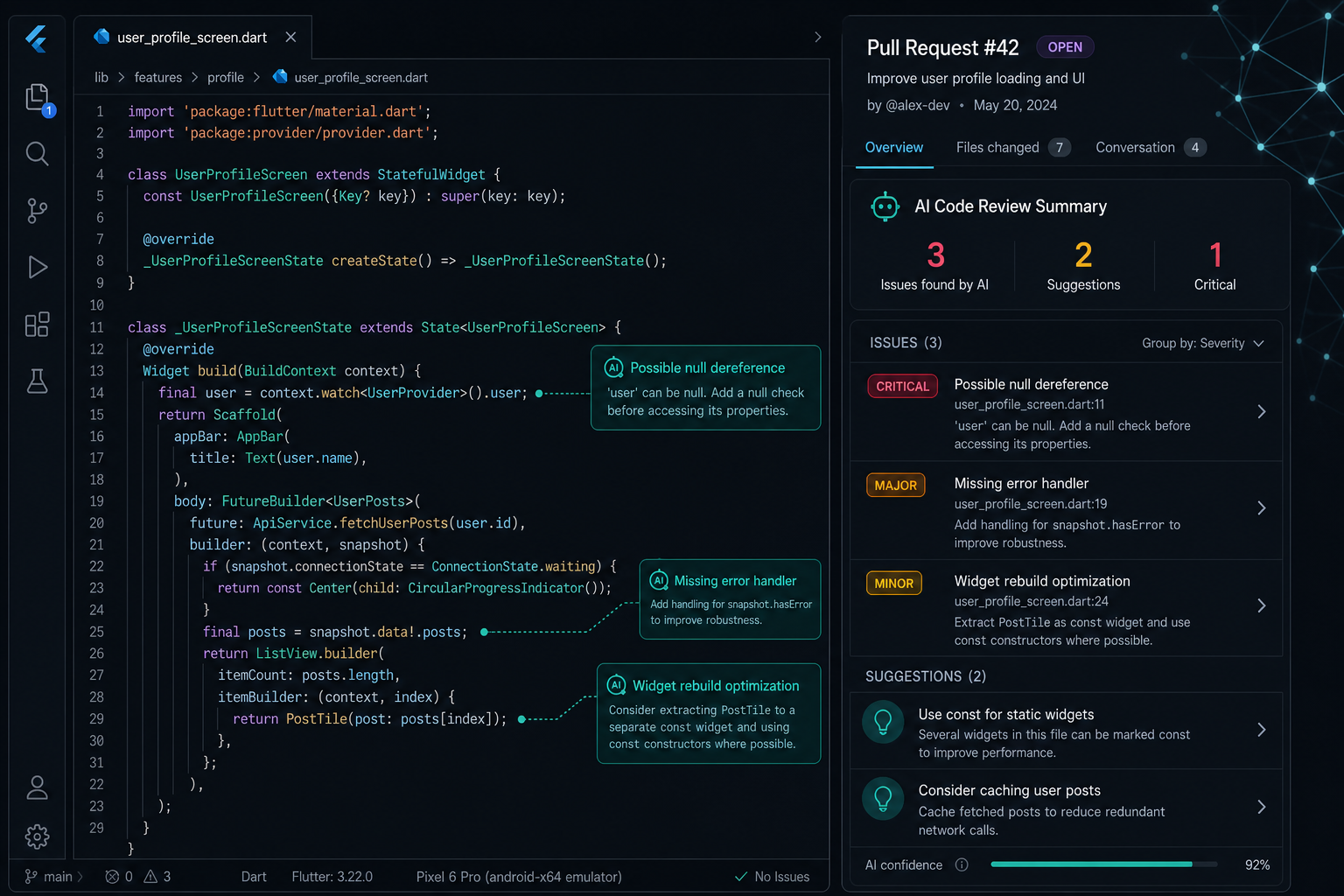
The final piece of our AI-enhanced workflow was integrating AI into the code review process itself. Our system analyzed every PR for patterns that correlate with bugs in Flutter applications:
- Missing null checks on API response fields that could crash the app when the backend returns unexpected data.
- State management anti-patterns — like modifying state outside the proper lifecycle — that lead to inconsistent UI or memory leaks.
- Accessibility gaps: missing semantic labels, insufficient contrast ratios, and touch targets below the 48dp minimum.
- Performance risks: unnecessary widget rebuilds, unoptimized image loading, and synchronous operations that could block the main thread.
The AI didn't replace our code review culture — every PR was still reviewed by a human engineer. But the AI handled the mechanical, pattern-matching aspects of review, freeing our senior engineers to focus on architecture, design decisions, and mentoring.
Over three months, AI-assisted code review flagged 37 issues that would have reached production without it. That includes two critical bugs — a race condition in the offline sync queue and a memory leak in the real-time dashboard — that would have been expensive to debug in production.
The Results: Quality at Speed
After six months of running this AI-enhanced testing framework in production, the numbers speak clearly:
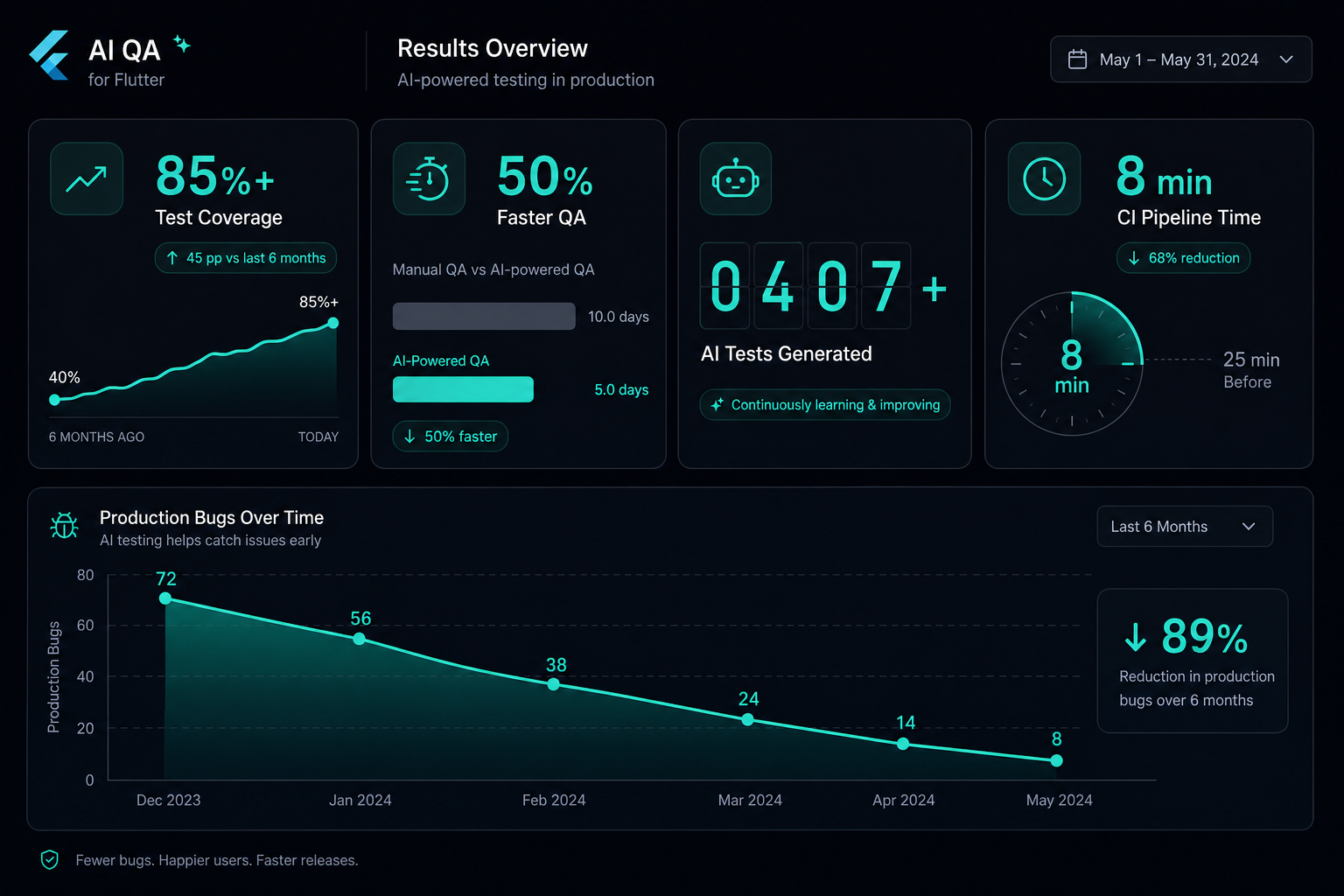
- Test coverage went from approximately 40% to over 85% — with AI-generated tests covering edge cases, boundary conditions, and platform-specific behaviours that our team hadn't reached manually.
- QA cycle time dropped by 50%, from 3-4 days per release to under 2 days — largely because AI-assisted code review and automated test maintenance caught issues earlier in the pipeline.
- Production bug rate decreased by 60% compared to the six months prior to deploying the AI framework.
- CI pipeline time dropped from 25 minutes to an average of 8 minutes per PR through intelligent test prioritization.
- Engineer satisfaction with the testing workflow improved significantly — our team reported spending less time on tedious test maintenance and more time on meaningful engineering work.
These aren't vanity metrics. Fewer production bugs means fewer emergency fixes, fewer customer complaints, and more time spent building features instead of fighting fires. Faster CI means engineers stay in flow. Better coverage means the team ships with confidence.
What This Means for InfAI's AI-First Approach
This project is a concrete example of what we mean when we say InfAI is an AI-first engineering company. We don't use AI as a marketing buzzword — we embed it into the actual engineering processes that determine whether software ships reliably.
The pattern we used here — build the core product with strong fundamentals, then layer AI into the workflows around it — is repeatable across every engagement we take on. Whether it's testing, deployment, monitoring, or incident response, there are always high-effort, pattern-heavy tasks where AI amplifies what skilled engineers can achieve.
Our engineers don't see AI as a threat to their work. They see it as leverage. And the results consistently prove them right.
Key Takeaways for Engineering Leaders
If you're considering how AI can fit into your engineering workflows, here's what we learned:
- Start with a real problem, not a technology. We didn't adopt AI testing tools because they were trendy — we built them because our test coverage was inadequate and our QA cycles were too slow.
- Keep humans in the loop. Every AI-generated test was reviewed by an engineer. Every AI-proposed assertion update was approved by a human. The AI handles volume and pattern recognition; humans handle judgment and intent.
- Invest in feedback loops. The AI got better over time because our engineers actively refined its outputs. Without that feedback cycle, the tools would have stagnated.
- Measure what matters. Test coverage, QA cycle time, production bug rate, CI speed — pick metrics that reflect real engineering outcomes, not just AI adoption.
- Think beyond code generation. The most valuable AI applications in our workflow weren't about writing code — they were about maintaining tests, prioritizing execution, and catching bugs in review.
FAQs
Flutter gave us the best combination of performance, developer productivity, and testability for this project. Its widget-based architecture maps cleanly to component testing, Dart's type system catches bugs early, and a single codebase meant our AI testing tools only needed to target one framework. For projects with different constraints, we evaluate each option on its merits.
No, and that's not the goal. AI-generated tests excel at coverage breadth — catching edge cases, boundary conditions, and state combinations that humans miss. But human-written tests are better at encoding business intent, testing user journeys, and validating that the application solves the right problem. The two approaches complement each other.
We built the framework incrementally over about eight weeks. AI test generation came first (two weeks to initial capability), followed by test maintenance automation (three weeks), intelligent prioritization (two weeks), and AI-assisted code review (one week for initial integration). Each component was deployed and refined independently.
The principles are framework-agnostic. We've applied similar AI-enhanced testing strategies to React, Node.js, and Python projects. The specific implementation details change — different test frameworks, different dependency graphs — but the core ideas of AI test generation, automated maintenance, and intelligent prioritization transfer directly.
The upfront investment is primarily engineering time — building the pipeline, training the models on your codebase, and establishing the feedback loops. For this project, we estimate the framework paid for itself within three months through reduced QA time, fewer production incidents, and faster release cycles. The ongoing cost is minimal once the system is running.
Build Your Team, Not Just a Contract
With InfAI's offshore dedicated teams, you get professionals who join your workflow for the long run. Grow steadily, stay flexible, and work with people who care about your success as much as you do.